Content design can simplify and improve interaction design, removing unnecessary CTAs and text.
The challenge
Review of a prototype biometric app designed by an intern. The app allowed travellers to verify their identity before they got to the airport, saving time at security checkpoints and boarding.
The verification flow involved travellers taking a selfie then scanning their passports or ID cards.
Travellers must be able to verify their identity without friction or confusion.
The process
The first step was to review Figma mockups. I worked with the product manager and UX designer intern to understand the requirements for the app. I proposed new guidance for taking a selfie.
Once we had a technically functioning prototype, I tested my proposals for the selfie. No iteration was required.
However, it became clear that test participants struggled to scan their documents. The scanning feature was provided through a third-party plugin. I collaborated with the plugin provider to understand technical constraints and what each of their error messages meant.
I then proposed and tested new guidance for scanning, which was implemented locally in our app. The updated guidance was passed on to the third-party provider, who expressed interested in updating their own error messages.
Issues and solutions
Taking a selfie
The issue
The solution
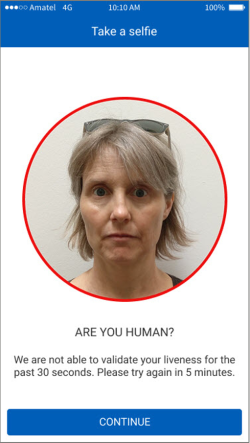
If the camera doesn’t detect motion while taking a selfie, the user sees a photo of themselves with guidance to solve the issue. The intern’s original wording was confusing and didn’t follow the company’s tone of voice guidelines.
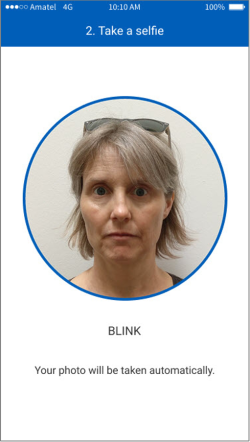
I brought the text in line with our brand guidelines. The text is much shorter. It explains that blinking will take the photo automatically. The CTA is no longer needed, removing an unnecessary interaction.
Original mockup
Revision
Scanning passports and ID cards
The issue
Error messages stated the problem but didn’t explain how to resolve it. Here are a couple of examples.
Original error A
Choose a different background
Original error B
No document detected
The solution
The error messages explain how to resolve the problems, within character limit contraints.